No Lock-In
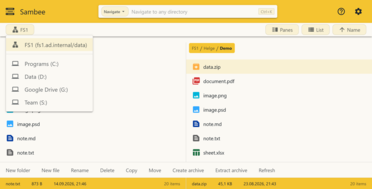
Use the storage you have
Connect to the Windows file servers, NAS devices, and local drives you already use. No syncing, re-indexing, or proprietary database.
Turn your storage into a modern workspace—no migration, syncing, or cloud required.
Connect to the Windows file servers, NAS devices, and local drives you already use. No syncing, re-indexing, or proprietary database.
Open files in Word, Photoshop, and other installed apps. When you save, changes go straight back to the original share.
Use OIDC single sign-on while Sambee honors your existing Windows or Linux/POSIX permissions.
Keep file access in your own environment instead of routing everyday file handling through cloud storage.
Browse large SMB directories with search, keyboard shortcuts, dual-pane navigation, and instant navigation to any directory.
View images, PDFs, and Markdown directly in the browser, including formats browsers do not handle well on their own.
Open files in Word, Photoshop, LibreOffice, and other installed desktop apps through Sambee Companion.
Use the same system from a workstation, tablet, or phone without giving up core functionality.
Deploy with Docker, place it behind your reverse proxy, and connect it to the SMB storage you already use.
One interface for the storage you already run.
Connect to Windows file servers, NAS devices, Samba servers, and other SMB-compatible storage.
Connect to local drives (requires the optional Sambee Companion app).
Your identity provider. Your access rules.
Connect Sambee to your OIDC identity provider, including Keycloak and Authelia.
Admit users and assign Administrator, Editor, or Viewer roles from identity-provider groups.
Start with OIDC alongside local passwords, then switch to passwordless OIDC-only sign-in when ready.
Move through large file trees without digging through folders.
Switch between focused browsing and side-by-side workflows depending on whether you are reviewing, comparing, or moving files.
Move through large file trees faster with keyboard-first controls built for speed and efficiency.
Jump straight to your target folder instead of having to remember and navigate complex directory hierarchies.
Inspect many types of files directly in the browser.
Move quickly even through large image sets with a fast and responsive viewer.
Viewing, browsing, and searching files feels natural on both desktop and mobile devices.
Search inside PDF documents to quickly find specific content.
View, search, and edit Markdown files without opening another app.
Full Markdown support for rendering, searching, and editing without needing to switch into a separate editor.
View Markdown files with rich formatting, seamlessly switch to editing mode when needed.
Edit tables directly in the rendered view.
View and edit text and code files in the embedded editor.
Built on CodeMirror, a feature-rich, fast, and mature browser-based editor.
Support for many formats and file types.
Handle the everyday file operations that normally force users back to desktop file managers.
Take care of common file and folder operations from one browser interface.
Move files and folders between local drives and SMB shares.
Archives are virtual folders you can move around in. Files from within archives can be viewed directly without a need to extract them first.
Open and edit any file in its installed desktop application directly from your browser.
Open files in Word, Photoshop, LibreOffice, and other installed desktop apps directly from Sambee.
Sambee collects edited files from the desktop app and saves them back to their source location.
Never lose work with built-in conflict handling.
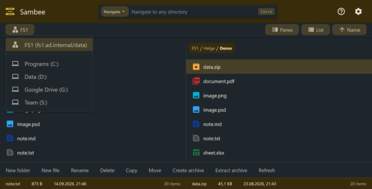
Choose between different themes or create your own to make the user interface your own.
Tune Sambee's UI to your preferences and environments with themes.
Choose between friendly light and dark themes, designed to be easy on the eyes.
Support fast day-to-day browsing by keeping the underlying system efficient as well as the interface.
Modern SMB protocol implementation optimized for high throughput and low latency.
Sambee requires only a single Docker container and runs efficiently even on smaller machines.
Sambee converts files only when needed while previewing them in the browser.
Sambee supports in-browser previewing for a broad range of file types, including images, PDFs, and Markdown.
The companion app extends Sambee to the local desktop, connecting Sambee to local drives and enabling native desktop editing.
Sambee is designed for environments that care about control. Deploy it with Docker, run it behind your reverse proxy, and connect it to the SMB storage you already use.
The goal is to make the storage you already trust easier to access from the browser.
Sambee is designed for environments that value control, inspectability, and infrastructure fit.